From hand-deployed docker-compose stacks to Dokploy services generated from a manifest: the path, the choices and the traps.
For a long time, each of my apps was deployed its own way. Jobspark had its pipelines and its Terraform folder, Jémima had its own, and two services ran as docker-compose outside any panel. Volumes carried prefixes inherited from abandoned project names. One of the apps had no backup outside the server.
It works, until the day you need to restore a database, add a machine, or just remember which volume is the right one. So I put the platform under code, with one simple rule: one app, one YAML file.
Describe, don’t deploy
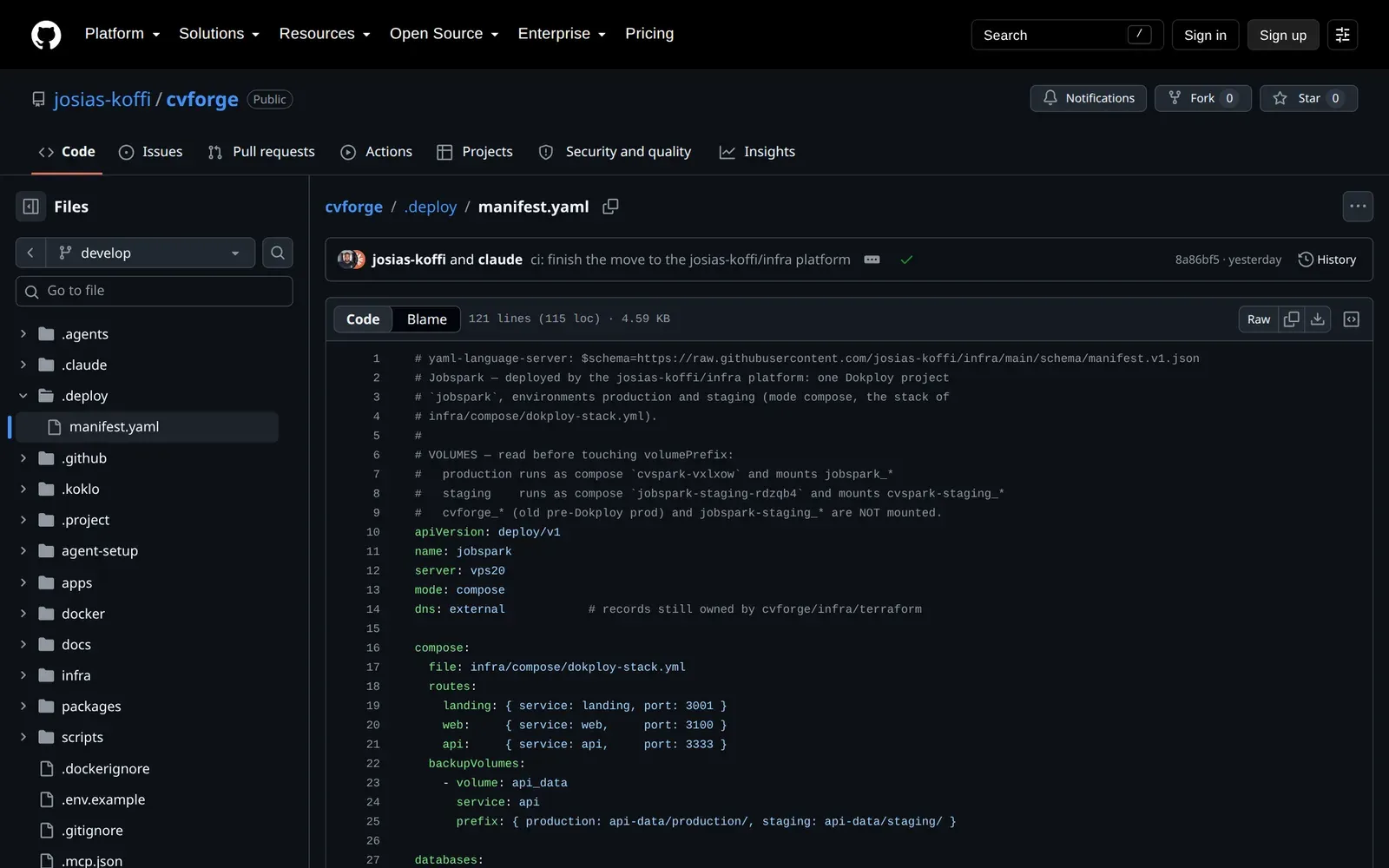
Each app puts a .deploy/manifest.yaml file next to its code. It describes what it runs: its apps, workers, databases, caches, environments and their domains. It says nothing about how to deploy them.
The platform, in a separate repo, reads that file and creates the rest in Dokploy: a project, one environment per stage, one service per component, HTTPS domains, DNS records at Cloudflare and backups to R2. The app repo holds no Terraform and no deploy script.
The app repo only holds its manifest. The engine lives in the infra repo, and the reusable workflow fetches it on every deploy.
A real manifest: this site’s
Here, barely shortened, is the manifest that deploys the site you are reading. Four components: the Next.js front end, the Payload CMS, a MinIO for media and a Postgres database.
apiVersion: deploy/v1
name: portfolio
server: vps20
mode: services

secrets: [DB_PASSWORD, PAYLOAD_SECRET, REVALIDATE_SECRET, CMS_API_KEY,
          MINIO_ACCESS_KEY, MINIO_SECRET_KEY, ADMIN_EMAIL, ADMIN_PASSWORD, …]
lockedSecrets: [PAYLOAD_SECRET, MINIO_ACCESS_KEY, MINIO_SECRET_KEY]

apps:
  web:
    image: ghcr.io/josias-koffi/portfolio-web
    registry: ghcr                      # paquet privé
    port: 3000
    domain: web
    healthcheck: /api/health
    uses: [cms]                         # CMS_URL=https://<domaine cms>
    vars:
      SITE_URL: https://${domains.web}
    resources: { cpus: 0.5, memory: 512m }
  cms:
    image: ghcr.io/josias-koffi/portfolio-cms
    port: 3000
    domain: cms
    healthcheck: /api/health
    uses: [db, web]                     # DATABASE_URL, WEB_URL
    vars:
      S3_ENDPOINT: https://${domains.media}
      S3_ACCESS_KEY: ${secrets.MINIO_ACCESS_KEY}
    resources: { cpus: 1, memory: 1g }
  media:
    image: ghcr.io/josias-koffi/minio
    tag: RELEASE.2025-04-22T22-12-26Z
    port: 9000
    domain: media
    volumes: { data: /data }            # <volumePrefix>_data, sauvegardé chaque jour

databases:
  db: { type: postgres, version: 16-alpine, database: portfolio, user: portfolio }

environments:
  production:
    branch: main
    deploy: manual                      # un push sur main ne déploie jamais
    domains: { web: koklo.dev, cms: cms.koklo.dev, media: media.koklo.dev }
  staging:
    branch: develop                     # deploy: auto (défaut)
    domains: { web: portfolio-staging.koklo.dev, cms: cms-staging.koklo.dev,
               media: media-staging.koklo.dev }
    overrides:
      apps: { cms: { resources: { memory: 768m } } }
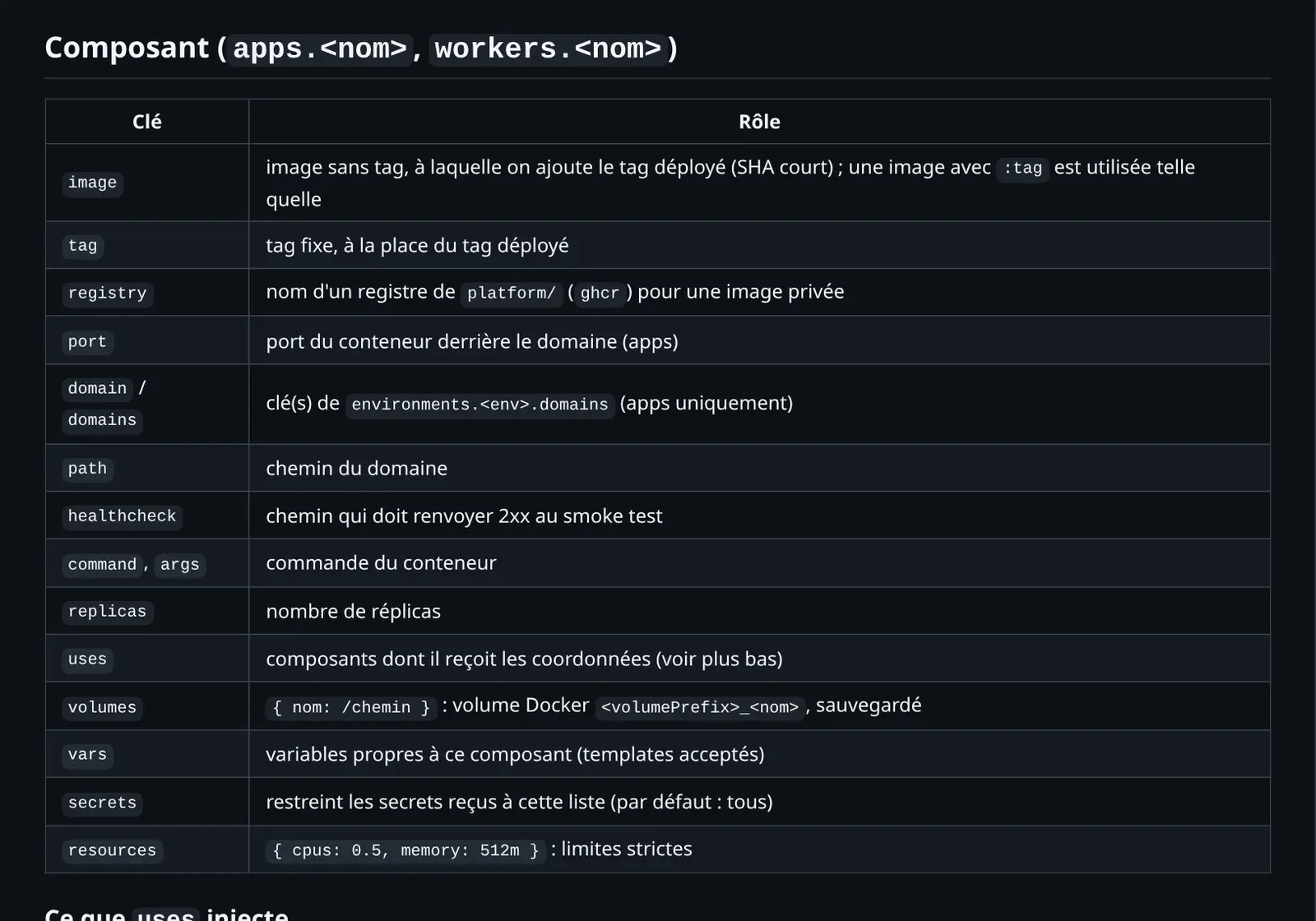
A few details matter. uses links components: the CMS gets DATABASE_URL because it uses db, and WEB_URL because it uses web. Values in vars are templates, with ${domains.media} or ${secrets.MINIO_ACCESS_KEY}, resolved for each environment. overrides changes a single value for a single environment, here the CMS memory in staging.
The file is validated by a JSON schema published in the repo. One line at the top of the manifest is enough to get completion in the editor.
What the file turns into
Each entry becomes one or more Dokploy objects. An app with a domain gives an application, an HTTPS domain with Let’s Encrypt and an A record. A volumes entry gives a mount and a daily backup. A database gives a Postgres service and its backup. None of this needs configuring: backups are on by default, and turning them off requires a written reason that the schema enforces.
To show it, I replayed the plan for this site’s staging in a copy of the module, with the mocked provider from the tests. No connection to Dokploy is made:
The four components of the manifest are there, plus one quiet resource, locked_secrets, which I come back to below. The backup details show the conventions: one prefix per app and environment, the database at 3am, volumes at 4am, and seven copies kept in staging against thirty-five in production.
The part of the module that translates uses is short. A database gives six variables, another app gives its public URL:
contains(keys(local.databases), u) ? [
  for line in [
    ["HOST", local.db_hosts[u]],
    ["PORT", tostring(local.default_ports[local.databases[u].type])],
    ["NAME", try(local.databases[u].database, "")],
    ["USER", local.databases[u].user],
    ["PASSWORD", local.db_password[u]],
    ["URL", format("%s://%s:%s@%s:%d/%s", …)],
  ] : "${try(local.databases[u].envPrefix, "DATABASE")}_${line[0]}=${line[1]}"
] : contains(keys(local.components), u) ? [
  # App to app goes through the public domain: an app_name is only
  # known after its own create […]
  "${upper(replace(u, "-", "_"))}_URL=https://${local.domains[local.components[u].domain]}",
] : ["# unknown uses entry: ${u}"]
The comment says why one app calls another through its public domain: a service’s internal name is only known after it is created. It is an accepted limit, written down in the docs.
Validate before planning
A wrong manifest must never reach the plan. The validator checks the schema first, then consistency: every uses names a known component, every domain exists in every environment, every database has its password secret declared.
The second file has three errors the schema alone would not catch. The third is refused by the schema itself. The same script runs locally, in make test, and as the first step of every deploy.
Deploy rules live in the manifest
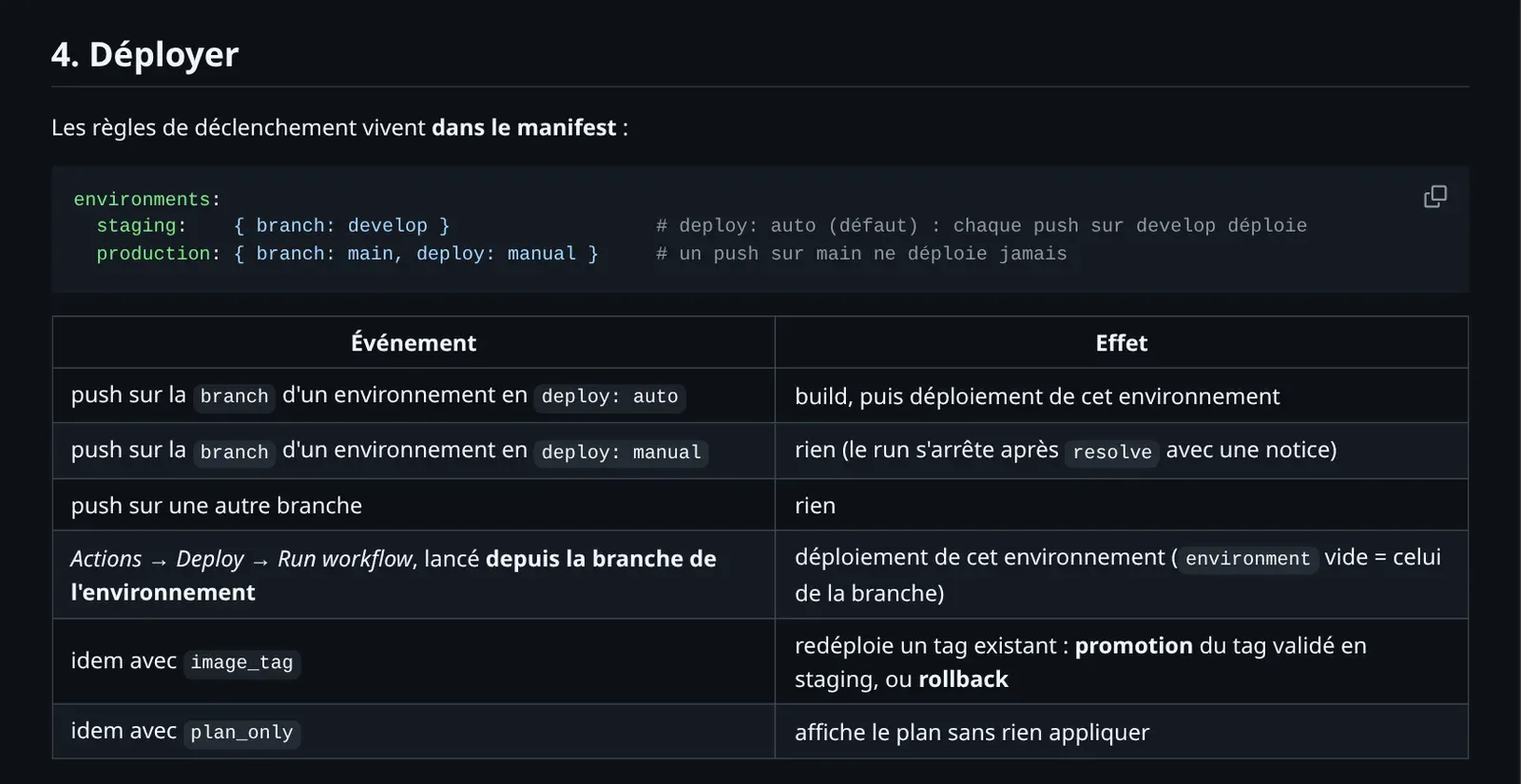
At first, trigger rules lived in each app’s workflows. I moved them into the manifest: each environment states its branch, and whether it deploys on every push (deploy: auto, the default) or only by hand (deploy: manual).
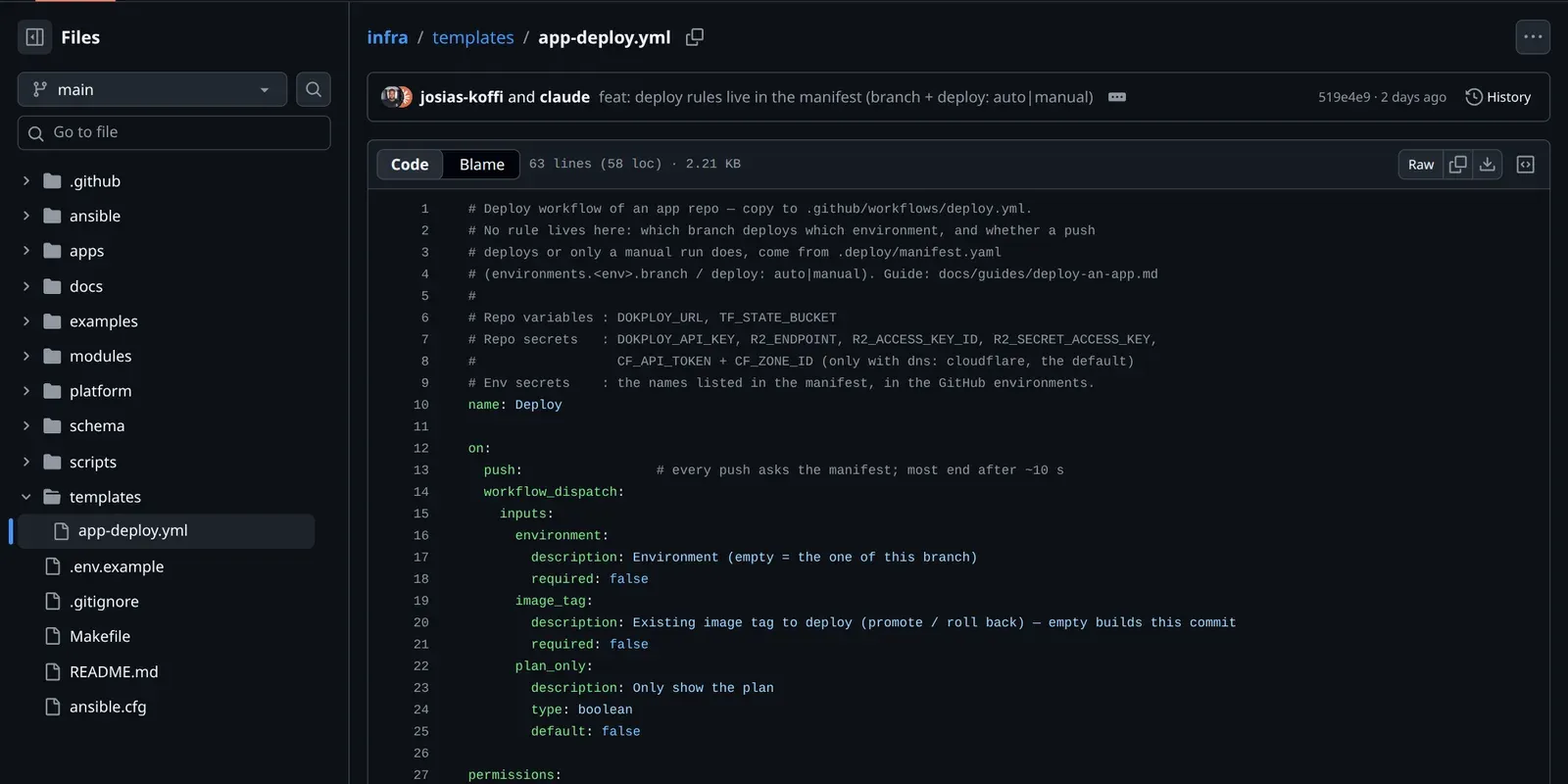
The app’s workflow first calls resolve.yml, which reads the manifest and answers three questions: should it deploy, to which environment, with which tag. The tag is the commit’s short SHA. The app builds its images if asked to, then calls deploy.yml, which does the rest.
In production, this site is deploy: manual. A push to main therefore does nothing but read the manifest:
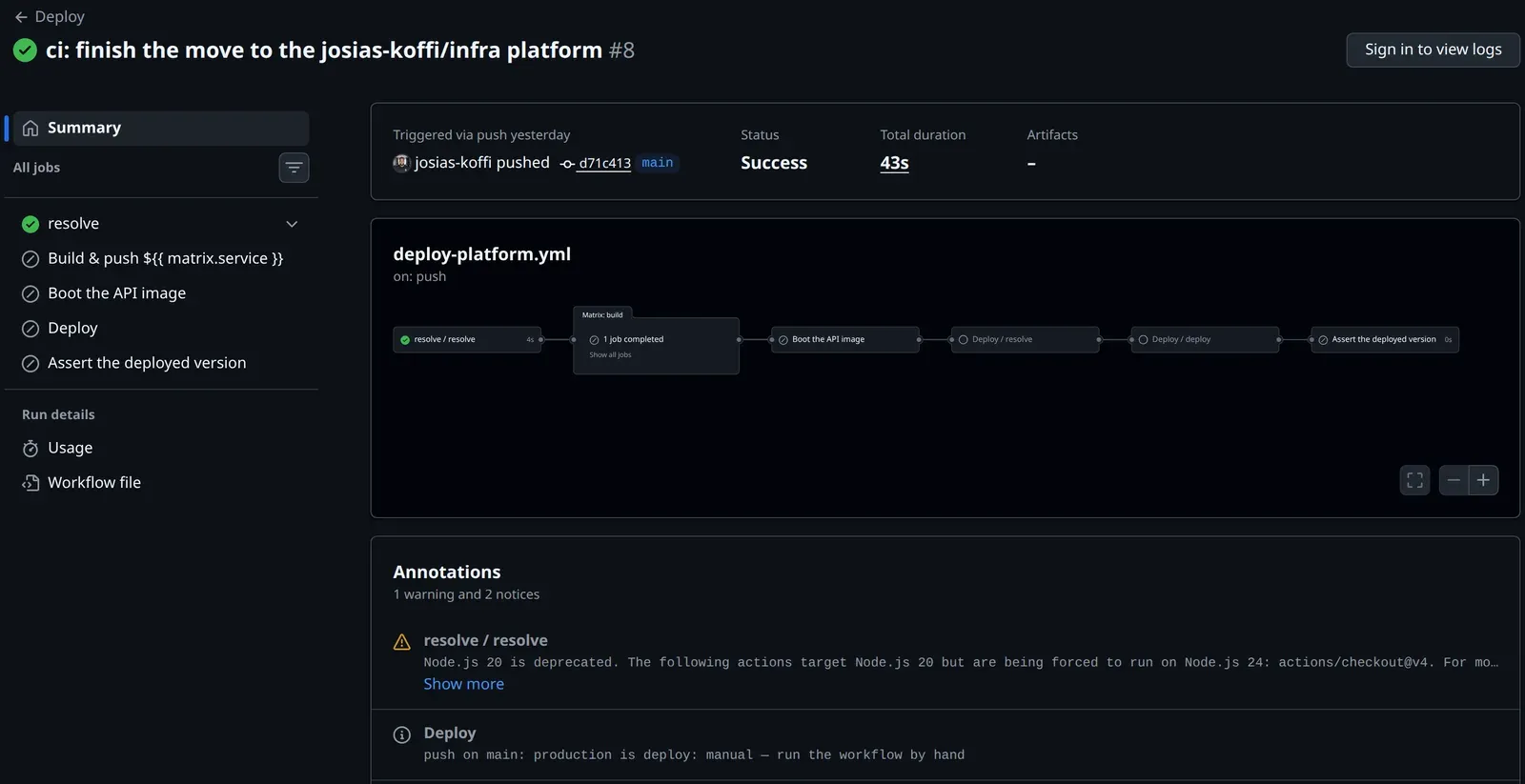
To ship, I rerun the workflow from main with the tag already running in staging. It is a promotion, not a new build. A rollback is the same move with an older tag.
The guards
A declarative file has one danger: deleting a line can delete a database. So the deploy script saves the plan, reads it back as JSON and refuses two things before the apply.
- Destroying a stateful resource: a database, cache, compose or mount. Removing an environment goes through a protected
purge-envworkflow, which archives the volumes first. - Changing a locked secret. Postgres only reads its password when the volume is created. Changing
DB_PASSWORDlater updates the variable, not the role, and the app can no longer connect. The state keeps the SHA-256 hash of each locked secret, and a plan that changes it is refused. That is thelocked_secretsresource in the plan above.
On this site, PAYLOAD_SECRET is locked because it signs sessions and the API key index, and so are the MinIO root keys because MinIO encrypts its config with them. A deliberate rotation is still possible, one name at a time, with ALLOW_SECRET_CHANGE.
Taking over what exists
The hardest part was not writing the module, but taking over stacks in production without breaking anything. Before touching anything, I dumped the four databases with their row counts and copied the dumps off the server.
Then I checked how Dokploy behaves on a throwaway project. Changing a compose’s environment moves it in place, without even restarting the container. On the other hand, deleting a compose deletes its named volumes, unless they are declared external.
Old states were released with tofu state rm, never destroy. Existing R2 backups were imported as they were, with their historical layout, so no history was lost.
And the day the server dies
None of this matters unless you can start again from nothing. The procedure is written in the backups guide, and it needs nothing that is not in the repo or in R2.
- A new server: its IP in the Ansible inventory, in
platform/nodes.yamland in the panel’s DNS. make setup-managerinstalls Docker and Dokploy, at the pinned version. The role refuses to reinstall a running Dokploy.- Dokploy is restored from its own daily backup in R2: its database and
/etc/dokploy. make platform-apply, then each app’s workflow, staging first: services are recreated from the manifests.- Databases and volumes are restored from R2. DNS follows on its own, since the A records point to the declared server’s IP.
The same nodes.yaml file is how you add a machine. A second server is prepared with a playbook, declared in one line, and an app picks it with server:. It keeps its own Traefik, and Dokploy drives it over SSH.
What it changes day to day
- Staging deploys on every push to
develop, production in one click, with a tag already tested. - Every database and volume is backed up daily to R2, in one bucket per environment: staging has no access to production backups.
- One state per environment: a staging apply can neither read nor change production.
- A lost server is rebuilt from the repo and the backups, following a procedure written in the docs.
- A new app is a manifest, a copied workflow and its secrets in the GitHub environments.
There are still limits. There is no network between servers, so an app and its dependencies live on the same machine. Per-PR preview deployments are not modelled yet. But the question “how is this app deployed?” now has a single answer, and it fits in a file I review like the rest of the code.
#dokploy#terraform#opentofu#iac#github-actions#backups#cloudflare