My whole hosting platform described as code: one app = one YAML file.
- Role
- Architect and operator
- Period
- 2026
- Context
- Hosts Jobspark, Jémima and this site
1
file per app
2
environments per app
35 j
retention in production
0
destructive plans accepted
Context
docker-compose stacks deployed by hand, inconsistent volume names, uneven backups across projects.
The challenge
Standardise without breaking anything running in production, and make every server rebuildable from the repo.
- 01Infra
One manifest per app
Versioned JSON schema: apps, workers, databases, caches, environments, domains. A Terraform module turns it into Dokploy resources, one service per component.
- 02Ops
Data safe by default
Daily backup of every database and volume to R2. Deploys refuse any plan that destroys a stateful resource; deleting an environment archives its volumes first.
- 03Ops
Adoption without recreation
An existing production Dokploy is taken over through Terraform import: Jobspark and Jémima migrated with no downtime.
- 04Infra
Multi-server
Adding a machine = one Ansible playbook + one line in nodes.yaml. Automatic purge of images and build cache.
Architecture
Stack
- DDokploy
- Terraform / OpenTofu
- Ansible
- Docker
- Cloudflare (DNS, R2)
- GitHub Actions
- SPSauvegardes & PRA
- Linux
Results
- ✦Staging on every push, production on demand
- ✦Smoke test after every deploy
- ✦Server rebuildable from the repo and backups
The story
How it works
This is the operator’s path, which means mine: from the repo to an app online, then the day you want to remove something.
1. One repo, one layer per folder
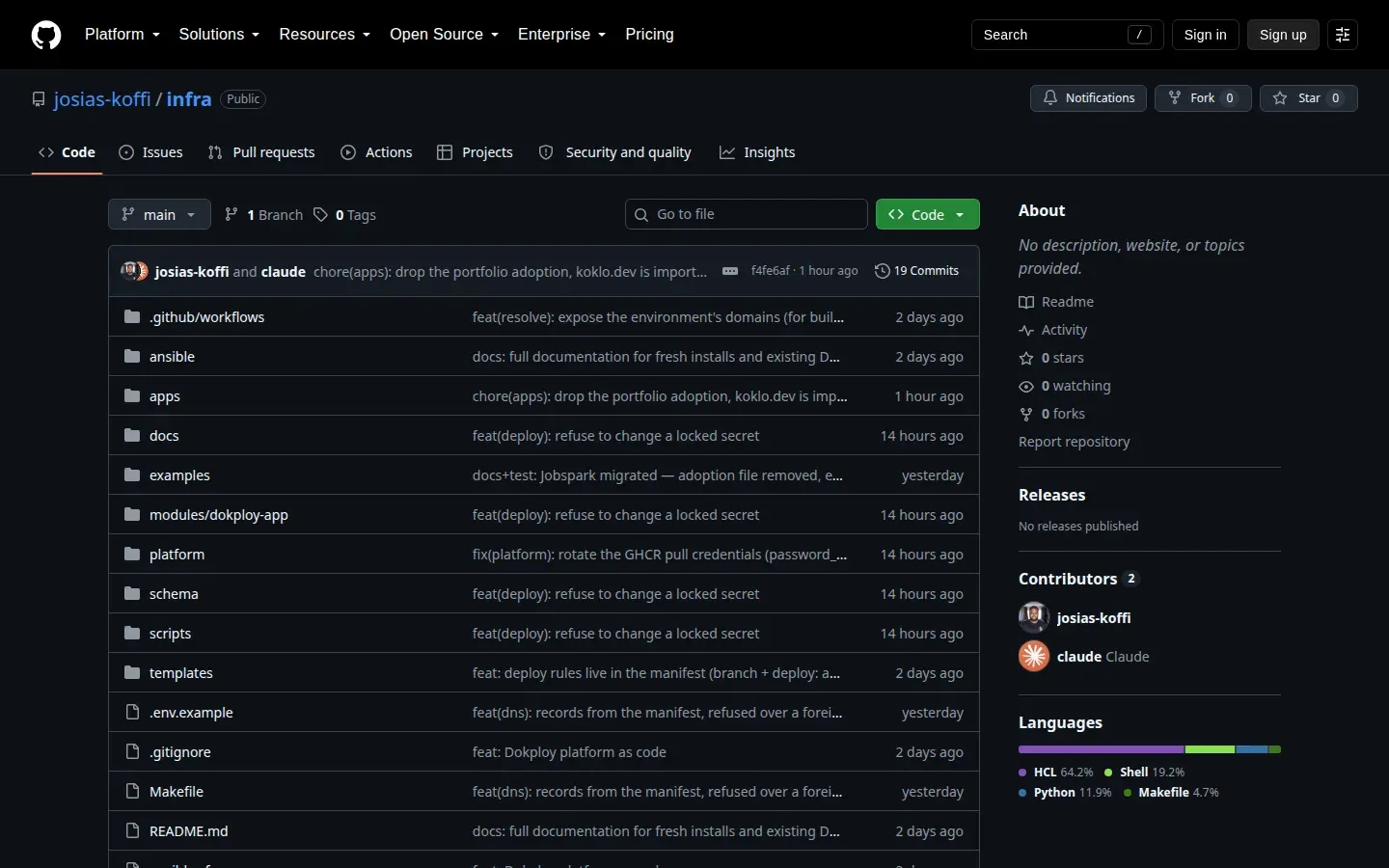
Everything lives in a public repo. ansible/ prepares the servers (Docker, Dokploy at a pinned version, purge). platform/ describes the Dokploy instance itself: settings, backup destinations, registry, remote servers. apps/project and apps/env are the two OpenTofu roots run for each app, and modules/dokploy-app turns a manifest into resources. An app repo only holds its .deploy/manifest.yaml and a workflow of a few lines.
2. A push to develop deploys staging

The first job, resolve, is a reusable workflow: it reads the manifest and decides whether this event deploys, to which environment, and with which tag. Here Jobspark builds its four images, boots the API image to check it starts, then calls deploy.yml. The last job compares the version served by the API with the deployed SHA.
3. A push to main deploys nothing
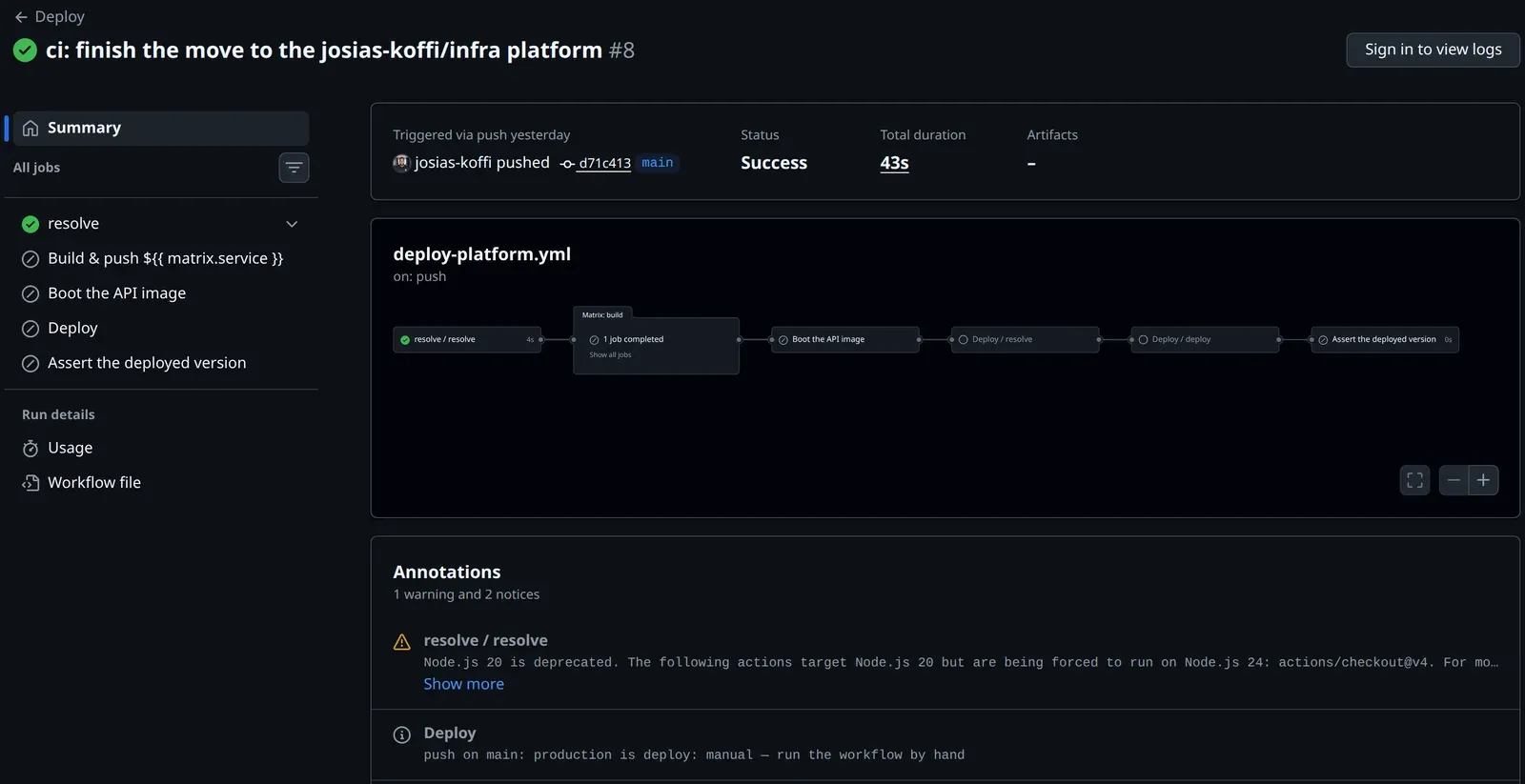
Production is deploy: manual. The run stops after resolve and leaves a notice. To ship, I run the workflow by hand from main, with the tag already validated in staging. The same button does rollbacks: you pass an older tag.
4. The plan is read before it is applied
scripts/deploy-app.sh validates the manifest, checks DNS, applies the project, then plans the environment. I replayed that plan on this site’s manifest with the mocked provider from the module tests: eleven resources for the portfolio’s staging, without any connection to Dokploy.
The manifest is all there: three applications (front, CMS, MinIO), their three HTTPS domains, the Postgres database and its backup, the MinIO volume and its backup, and the hashes of the locked secrets. Cloudflare DNS records are added in apps/env, outside the module.
5. Deleting takes another path
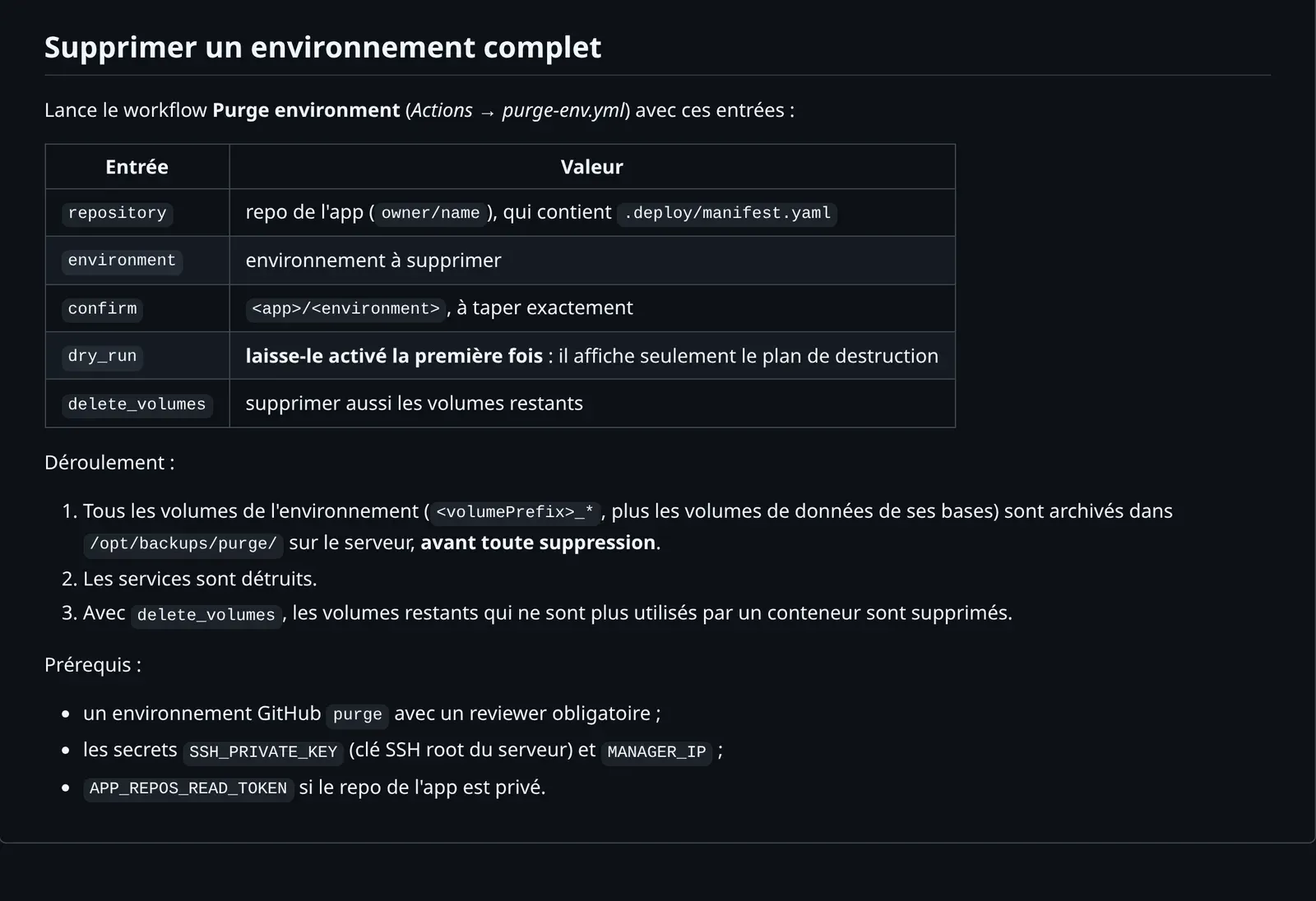
Removing a database from the manifest does not delete it: the deploy refuses. To remove a whole environment there is the purge-env workflow. It needs a reviewer and a typed <app>/<env> confirmation, and it runs as a dry run the first time. It archives every volume on the server before destroying anything.
6. Taking over what exists without recreating it
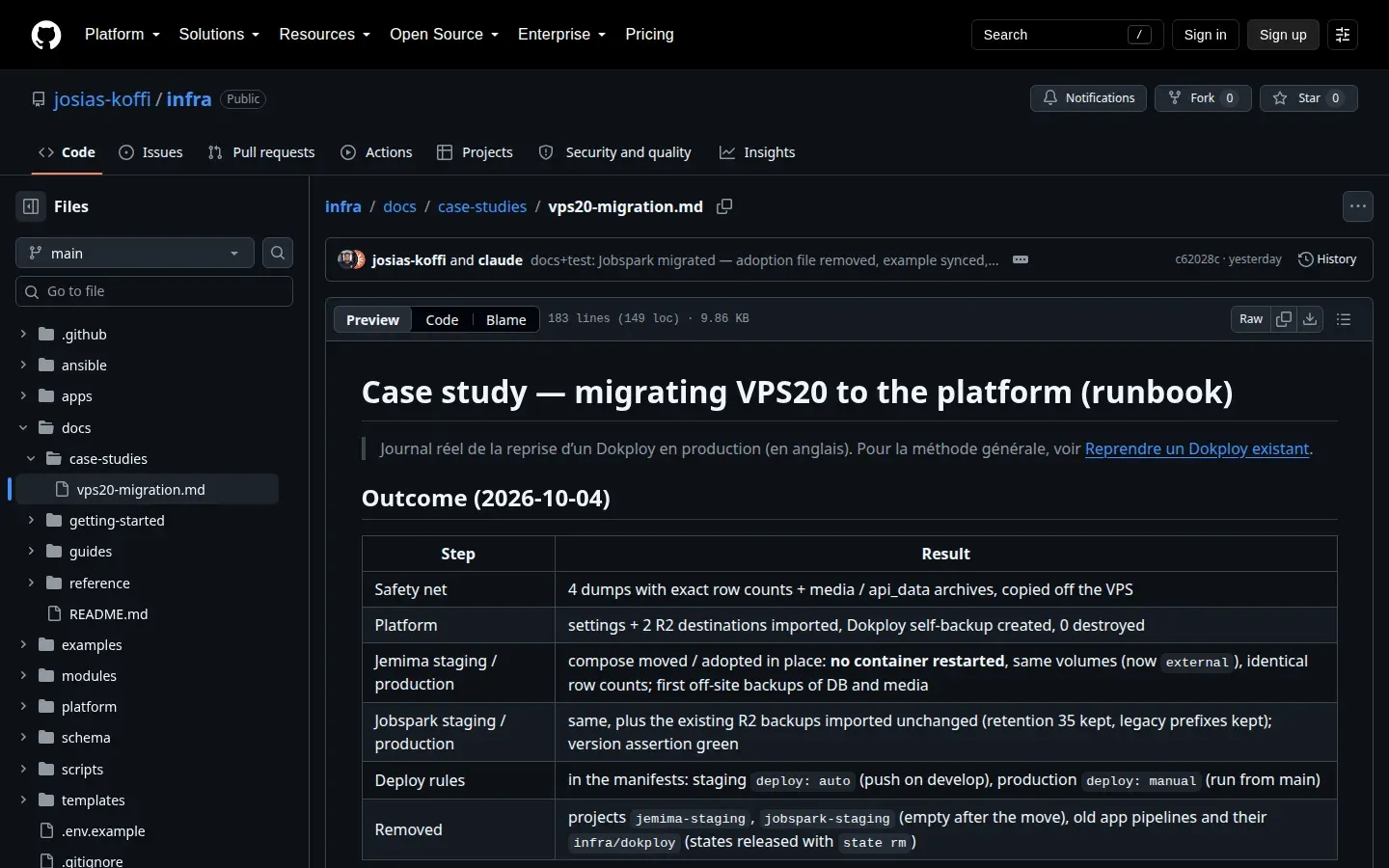
The Jobspark and Jémima stacks were already running on Dokploy as docker-compose. The platform took them over through import: the composes moved to their new environment in place, without restarting a container. The full log is in docs/case-studies, with the map of the volumes actually mounted.
Under the hood
From manifest to resources
Each step can stop the rest. Validation checks the JSON schema, then consistency: a uses entry must name a known component, every domain must exist in every environment. check-dns refuses a name already taken by a record the platform did not create. apps/project and apps/env have separate states, one per environment, stored in R2.
The guard against destructive plans
The plan is saved to a file, then read back as JSON. If it deletes a stateful resource, the script stops. It does the same if the SHA-256 hash of a locked secret changes: a database only reads its password when its volume is created, so changing the variable later would break connections. A deliberate rotation goes through ALLOW_SECRET_CHANGE, one name at a time.
plan = json.load(sys.stdin)
changes = plan.get("resource_changes", [])
stateful = ("dokploy_postgres", "dokploy_mysql", "dokploy_mariadb", "dokploy_mongo",
            "dokploy_redis", "dokploy_compose", "dokploy_mount")
bad = [r["address"] for r in changes
       if r["type"] in stateful and "delete" in r["change"]["actions"]]
if bad:
    print("Refusing to destroy stateful resources:", *bad, sep="\n  ")
    print("Use the purge-env workflow (protected) for an intended removal.")
    sys.exit(1)
To check it, I removed the database from the portfolio manifest in a copy of the module. The mocked plan does propose to destroy Postgres and its backup, and the guard, taken verbatim from the script, refuses it:
Several servers
platform/nodes.yaml lists the servers. Today there is only one, vps20, as manager: it hosts the Dokploy panel and the services. A second server is prepared with make add-node, then declared with the remote role; Dokploy drives it over SSH and it keeps its own Traefik. An app picks its machine with server:. There is no network between servers: an app and its dependencies live in the same place.
Tests
make test validates the example manifests, runs the module tests against a mocked provider and validates the three roots. The tests check details that mattered in production, for example that Jobspark keeps the prefix of its real volumes and the historical layout of its R2 backups.
What I take away
- Check Dokploy before trusting it. On a throwaway project I found that deleting a compose deletes its named volumes, unless they are
external. HenceexternalVolumes: truebeing mandatory in compose mode, andtofu state rmrather thandestroyto release old states. These findings are written down indocs/reference/dokploy-behaviour.md. - Put the rules in the manifest, not in the workflow. An app’s workflow decides nothing. Each environment’s branch and its
autoormanualmode sit in the same file as the services, and get read in code review. - Split states per environment. A staging apply can neither read nor change production. It is a bit more plumbing (read-only
terraform_remote_state), but it is what let me migrate staging first, with no risk to production.
Gallery